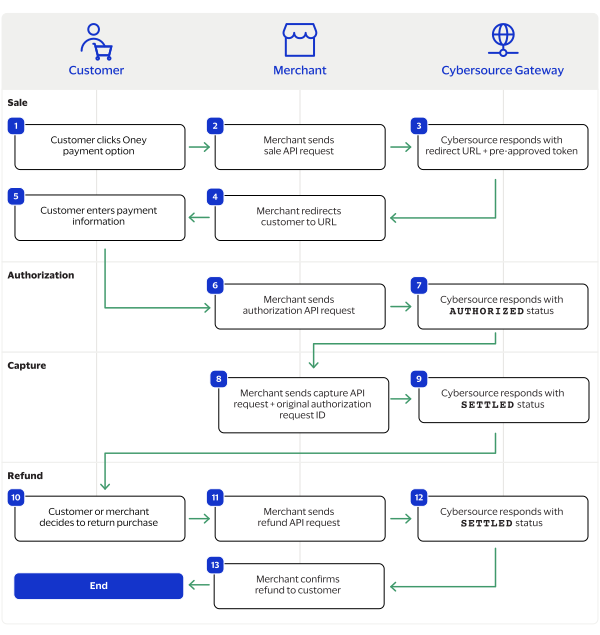
This workflow describes the sequence of events that comprises a successful Oney
refund.
Figure:
Oney by Thunes Refund Workflow
The customer chooses the Oney payment method from among the available payment
methods shown on the merchant's checkout page.
The merchant sends the create a session API request to
Cybersource
. The session service creates a unique customer session.
See Create a Session.
Cybersource
responds with
PENDING
status, a
URL to redirect the customer, and a pre-approval token.
The merchant sends the customer to the redirect URL page.
The customer completes the checkout on the redirection page within 20
minutes.
The merchant sends an authorization API request to
Cybersource
with the pre-approval token and any optional details. See Authorize a Payment.
Cybersource
responds to the merchant with one of these
statuses:
AUTHORIZED
: The payment is successfully
authorized.
PENDING
: Either the authorization is being audited by
Oney or the customer has not completed the checkout using the
redirection URL. The merchant should send a check status API request to
retrieve status updates. See Check a Transaction Status.